
Data Loss Prevention
Data Loss Prevention (DLP): Automatic Email Encryption for Sensitive Information
As part of our ongoing commitment to protecting your business, Mainstream Technologies now enables Data Loss Prevention (DLP) by default on every client’s email system. DLP automatically examines outgoing emails and attachments for sensitive information. When it finds protected data—such as Social Security numbers, bank or credit card numbers, or patient health information—it encrypts the email before it’s delivered. There’s nothing new for your team to learn: employees keep using Outlook exactly as they do today, and the protection works quietly in the background.
Why DLP Matters
One misdirected or unprotected email can expose a client’s personal data, trigger compliance violations, and damage the trust you’ve built. DLP removes the guesswork by securing sensitive messages automatically—no one has to remember to click “encrypt.” (For a deeper technical overview, see Microsoft’s guide to data loss prevention.)
- Automatic protection: Sensitive information is secured without employees manually encrypting anything.
- Reduced risk: Helps prevent confidential data from being unintentionally shared through ordinary email.
- Secure communication: Outside recipients open protected messages with a simple one-time verification code.
- Minimal disruption: Your team keeps using Outlook and its existing email workflows.
What Triggers Encryption?
Our DLP policies recognize several categories of sensitive information. When an outgoing email or attachment matches an enabled policy, it is encrypted automatically:
- Personally Identifiable Information (PII): Social Security numbers, driver’s license numbers, passport numbers, and other personal identifiers.
- Financial Information: Bank account and routing numbers, credit card information, and other financial identifiers.
- Protected Health Information (PHI) & HIPAA Data: Medical information, healthcare identifiers, and patient-related information protected under the HIPAA Security Rule.
- Payment Card Information (PCI): Credit and debit card data.
- Confidential Business Information: Certain intellectual property, credentials, and other sensitive business data.
What Happens When an Email Is Encrypted?
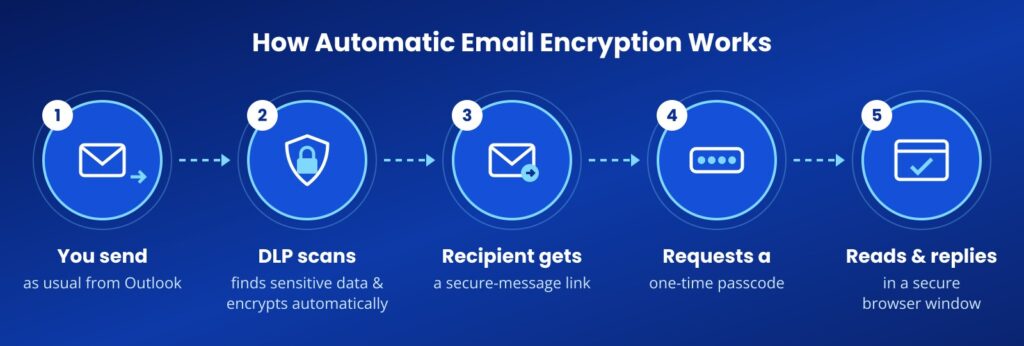
- You send an email as usual. If sensitive information is detected, the message is secured automatically—no extra steps for you.
- The recipient receives a notification. Instead of the sensitive email itself, they get a notice that a secure message is waiting, with a link to read it.
- The recipient verifies their identity. In the secure message portal, they click a button to request a one-time passcode, which is sent to their email address.
- The recipient enters the passcode. The message opens in a secure browser window—no special software or account registration required.
- The recipient reads and replies securely. Replies are sent through the secure portal, so the whole conversation stays protected.
Questions about an encrypted email, or need help opening a secure message? Call our support team at (662) 268-7705.
Data Loss Prevention FAQs
Do my employees need to do anything differently?
No. Your team keeps sending email from Outlook the same way they always have. Data loss prevention runs in the background and decides automatically when a message needs to be encrypted.
How will I know if one of my emails was encrypted?
The message sends normally on your end. Your recipient is the one who sees the difference: a notice that a secure message is waiting, with a link to open it.
What if my recipient doesn’t receive the passcode?
Ask them to check their junk or spam folder first, since the one-time passcode is sent to the same email address the message went to. If it still hasn’t arrived after a few minutes, either of you can call our support team and we’ll help them get in.
Can recipients reply securely?
Yes. Recipients can read and reply through the secure portal, so the conversation stays protected in both directions.
Does DLP make my business HIPAA or PCI compliant?
DLP is an important safeguard, but compliance also depends on your policies, training, and other technical controls. It helps protect the kinds of information those frameworks cover. Our Compliance as a Service team can review where your business stands.
Does DLP cost extra?
No. Data loss prevention is enabled by default and included as one of our value-add services at no extra cost.